
What is Dynamic VLAN and How 24online Can Implement It with Cisco and Ruckus Access Points
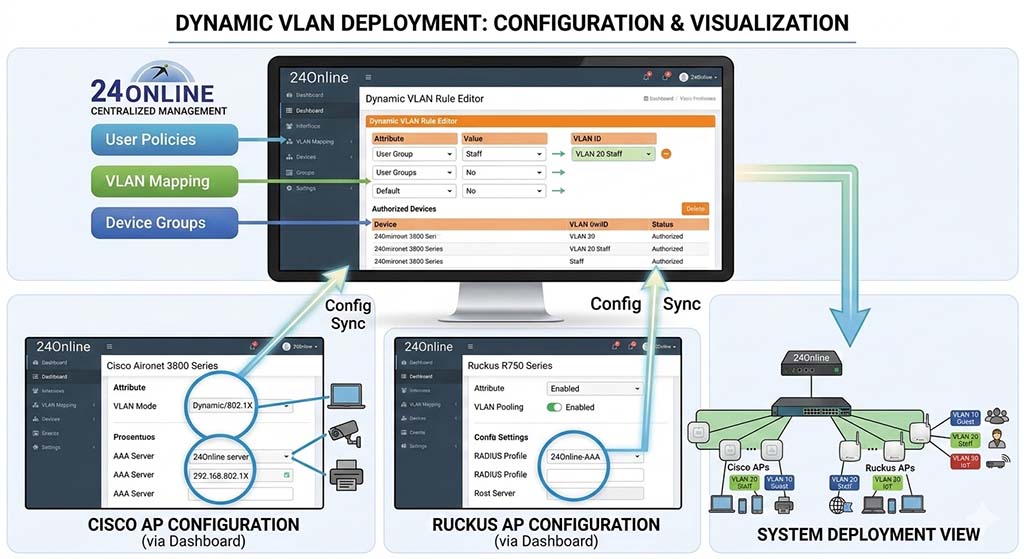
In modern enterprise and ISP networks, managing users on a static network can be inefficient and difficult to scale. Organizations need a smarter way to automatically assign users to the correct network segment based on their identity, device type, or authentication credentials. This is where Dynamic VLAN comes into play. By integrating authentication platforms like 24Online with networking infrastructure from Cisco and Ruckus Networks, service providers can automate VLAN assignment and significantly enhance network management and security.
What is Dynamic VLAN?
A Dynamic VLAN is a networking mechanism that automatically assigns users or devices to a specific VLAN after successful authentication. Instead of manually configuring VLANs on switch ports or access points, the VLAN assignment is controlled by an authentication server such as a RADIUS server.
When a user connects to the network, the authentication server verifies the credentials and instructs the network device (switch or access point) to place that user into a specific VLAN.
Key Benefits
Automated Network Segmentation – Users are automatically placed into the correct VLAN.
Improved Security – Unauthorized users cannot access restricted networks.
Simplified Network Management – Administrators do not need to configure VLANs manually for each port.
Scalability – Ideal for large Wi-Fi deployments such as campuses, hotels, and ISPs.
Role of 24online in Dynamic VLAN
24online acts as an AAA (Authentication, Authorization, and Accounting) platform and includes a built-in RADIUS server.
In a Dynamic VLAN environment, 24online performs the following functions:
Authenticates users (via captive portal, username/password, voucher, etc.)
Sends VLAN attributes to the network device through RADIUS
Tracks user sessions and bandwidth usage
Applies policies such as bandwidth limits or access restrictions
Dynamic VLAN Architecture
Typical components involved in the setup include:
User Device (Laptop / Mobile)
Access Point – from Ruckus Networks
Network Switch / Controller – from Cisco
Authentication Server – 24online
Core Network / Internet Gateway
Basic Workflow
User connects to WiFi through a Ruckus Access Point.
The AP forwards the authentication request to 24online via RADIUS.
24online verifies the user credentials.
24online sends a VLAN ID attribute in the RADIUS response.
The AP or switch dynamically assigns the user to the specified VLAN.
The user receives an IP address from the DHCP server of that VLAN.
VLAN Assignment Through RADIUS
During authentication, 24online sends VLAN information using RADIUS attributes such as:
Tunnel-Type = VLAN
Tunnel-Medium-Type = IEEE-802
Tunnel-Private-Group-ID = VLAN ID
For example:
| User Type | VLAN ID | Access |
|---|---|---|
| Staff | 10 | Internal Network |
| Students | 20 | Restricted Internet |
| Guests | 30 | Internet Only |
This ensures each category of users is automatically isolated within the network.
Implementation with Cisco and Ruckus
Step 1: Configure VLANs on Cisco Switch
On the Cisco switch, create the required VLANs.
Example:
VLAN 10 – Staff
VLAN 20 – Students
VLAN 30 – Guest
Ensure trunk ports allow these VLANs to pass between switches and access points.
Step 2: Configure Ruckus Access Points
On Ruckus Networks access points:
Configure SSID authentication via RADIUS
Point the RADIUS server to the 24online server IP
Enable dynamic VLAN assignment
Allow VLAN tagging from RADIUS responses
Step 3: Configure RADIUS in 24online
In 24online:
Add Cisco switches and Ruckus APs as NAS devices.
Configure RADIUS authentication.
Create user profiles mapped to VLAN IDs.
Assign VLAN attributes in the RADIUS reply.
Example:
| Profile | VLAN ID |
|---|---|
| Corporate Users | 10 |
| Students | 20 |
| Guests | 30 |
Step 4: DHCP Configuration
Each VLAN should have its own DHCP scope so that when users join a VLAN dynamically, they receive the correct IP address range.
Example:
| VLAN | DHCP Range |
|---|---|
| 10 | 192.168.10.0/24 |
| 20 | 192.168.20.0/24 |
| 30 | 192.168.30.0/24 |
Use Cases
Dynamic VLAN deployment using 24online is widely used in:
Universities and campuses
Hotels and hospitality WiFi
ISP hotspot networks
Corporate guest networks
Multi-tenant buildings
Conclusion
Dynamic VLAN is a powerful network segmentation technique that improves security, scalability, and management efficiency. By integrating 24Online with infrastructure from Cisco and Ruckus Networks, organizations can automate VLAN assignment based on user authentication.
This approach enables seamless user onboarding while ensuring that each user or device is placed into the appropriate network segment without manual configuration. As networks continue to grow in size and complexity, dynamic VLAN solutions like this are becoming an essential part of modern network architecture.
Have questions or want to see the 24Online AAA Server in action?
Get in touch with us today to schedule a demo.
📧 Email: sales@24onlinetech.com
📞 Call: +91 85850 04344
Follow us on Facebook, LinkedIn and YouTube to stay updated on the latest technological innovations in the telecom industry.
Contact us for free consultation for your ISP Requirement