
Exploring the 24Online Authentication Flow: Secure, Flexible, and User-Friendly Access Management
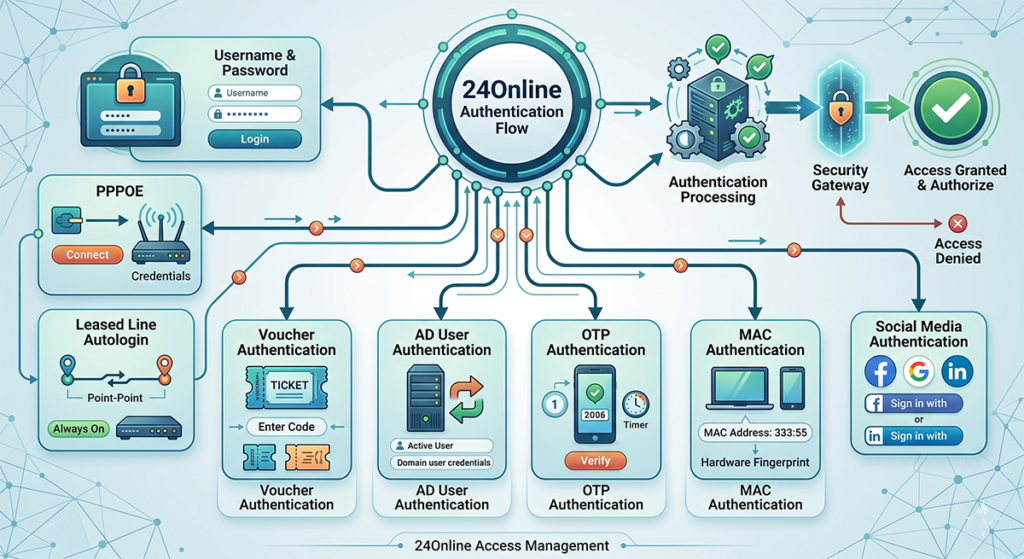
In today’s connected world, Internet Service Providers (ISPs), hotels, enterprises, and hotspots need robust systems to manage user access, billing, and security. 24Online is a comprehensive AAA (Authentication, Authorization, and Accounting) platform designed for this purpose. It supports multiple authentication methods, making it versatile for different deployment scenarios—from home broadband to public Wi-Fi and hospitality environments. This blog post dives into the various authentication flows supported by 24Online, explaining how each works and its ideal use cases.
Authentication Flow
1. Username & Password Authentication
This is the most common and straightforward method.
How it works:
- Users are redirected to a captive portal (a web page that appears before internet access is granted).
- They enter their registered username and password.
- 24Online verifies the credentials against its database or integrated systems.
- Upon success, the system authorizes the session with appropriate bandwidth, time limits, or data quotas.
Advantages: Simple for users, easy to manage, supports billing integration.
Best for: Residential broadband, office networks, and general hotspot access.
2. PPPoE Authentication
Point-to-Point Protocol over Ethernet (PPPoE) is widely used in broadband deployments.
How it works:
- Users configure a PPPoE dialer on their device (or router) with username and password.
- The Broadband Network Gateway (BNG) or router sends a RADIUS request to 24Online.
- 24Online authenticates and returns authorization attributes (IP address, speed limits, etc.).
- The session is established directly at the protocol level—no captive portal needed for ongoing use.
Advantages: Highly secure, supports session persistence, ideal for always-on connections.
Best for: Fixed broadband, fiber, or cable ISPs where users have dedicated lines.
3. Leased Line Autologin
For dedicated leased lines or fixed connections, 24Online offers seamless autologin.
How it works:
- Authentication is often tied to the IP address or MAC address of the connection.
- Users (or the system) are automatically logged in upon connection detection.
- No manual credentials are required after initial setup.
Advantages: Zero-touch experience for users with permanent connections.
Best for: Corporate leased lines, enterprise branches, or high-value fixed connections.
4. Voucher Authentication
Popular in hospitality and public hotspots, voucher-based access provides temporary credentials.
How it works:
- Administrators generate branded vouchers or coupons with unique username/password pairs.
- Guests enter the voucher details on the captive portal.
- 24Online validates the code, activates the session for a predefined duration or data limit, and handles accounting.
Advantages: Easy for walk-in users, supports prepaid models, and customizable branding.
Best for: Hotels, cafes, events, and public Wi-Fi zones.
5. AD/LDAP User Authentication (Active Directory)
Integration with enterprise directories for seamless corporate access.
How it works:
- 24Online integrates with Microsoft Active Directory (AD) or LDAP.
- Users log in using their corporate AD credentials.
- The system checks against the directory and can apply group-based policies (e.g., different bandwidth for departments).
Advantages: Single Sign-On (SSO) experience, centralized user management, and strong security.
Best for: Offices, educational institutions, and enterprises.
6. OTP Authentication
One-Time Password adds an extra layer of security, often used with SMS or email.
How it works:
- User enters username (or mobile number).
- 24Online sends a time-limited OTP via SMS, email, or app.
- User verifies the OTP on the captive portal to complete login.
- Can be combined with other methods for Multi-Factor Authentication (MFA).
Advantages: Enhanced security against credential theft, convenient for guests.
Best for: High-security environments, guest Wi-Fi, and compliance-heavy setups.
7. MAC Authentication
Device-based authentication using the hardware address.
How it works:
- The user’s MAC address is registered or auto-captured during first login.
- Subsequent connections are automatically authenticated based on the MAC.
- Often combined with other methods for binding.
Advantages: Convenient “auto-login” feel, reduces password fatigue.
Best for: Managed devices, IoT, or environments where devices are static (with caution due to spoofing risks).
8. Social Media Authentication
Modern and user-friendly for public access.
How it works:
- Captive portal offers “Login with Google/Facebook/Instagram/etc.” options.
- 24Online uses OAuth or similar protocols to verify the social login.
- User profile details can be captured (with consent) for marketing or analytics.
Advantages: Frictionless experience, higher conversion for guest networks, data collection potential.
Best for: Cafes, malls, events, and tourism spots.
Why 24Online Stands Out
24Online’s strength lies in its flexibility. Administrators can configure multiple methods simultaneously, set fallback options, customize captive portals, and integrate with billing, SMS gateways, and third-party systems. It provides detailed accounting for usage (time, data, sessions) and robust policy enforcement.
Whether you’re an ISP managing thousands of broadband users or a hotel offering guest Wi-Fi, 24Online’s authentication flows ensure security, convenience, and monetization.
Conclusion Choosing the right authentication method depends on your user base, security needs, and operational model. 24Online empowers you with all the tools in one powerful platform. If you’re looking to streamline your network access management, exploring these flows can significantly improve user experience and reduce support overhead.
Have you implemented 24Online in your network? Share your experience in the comments! For more insights on network management and ISP solutions, stay tuned.
Contact the 24Online team for a demo or consultation tailored to your network needs.